Most LLMs are impressive talkers. Ask GPT-4o about quantum physics, and it'll give you a solid explanation. Ask it to check your CRM for open leads, and it'll politely tell you it can't do that. Function calling changes this. It gives models the ability to do things, not just say things.
How function calling actually works
Function calling allows large language models (LLMs) to interact with external tools, APIs, and functions based on user input. Instead of generating text alone, the LLM can recognize that a specific action needs to happen and request that action from an external function.
This means users can talk to complex systems in natural language while the LLM handles the function executions behind the scenes. Ask for the weather, and the model calls a weather API to get real-time data instead of guessing based on its training data. It might even remind you to grab an umbrella.
The function calling process
Here's what happens under the hood when a model decides to call a function:
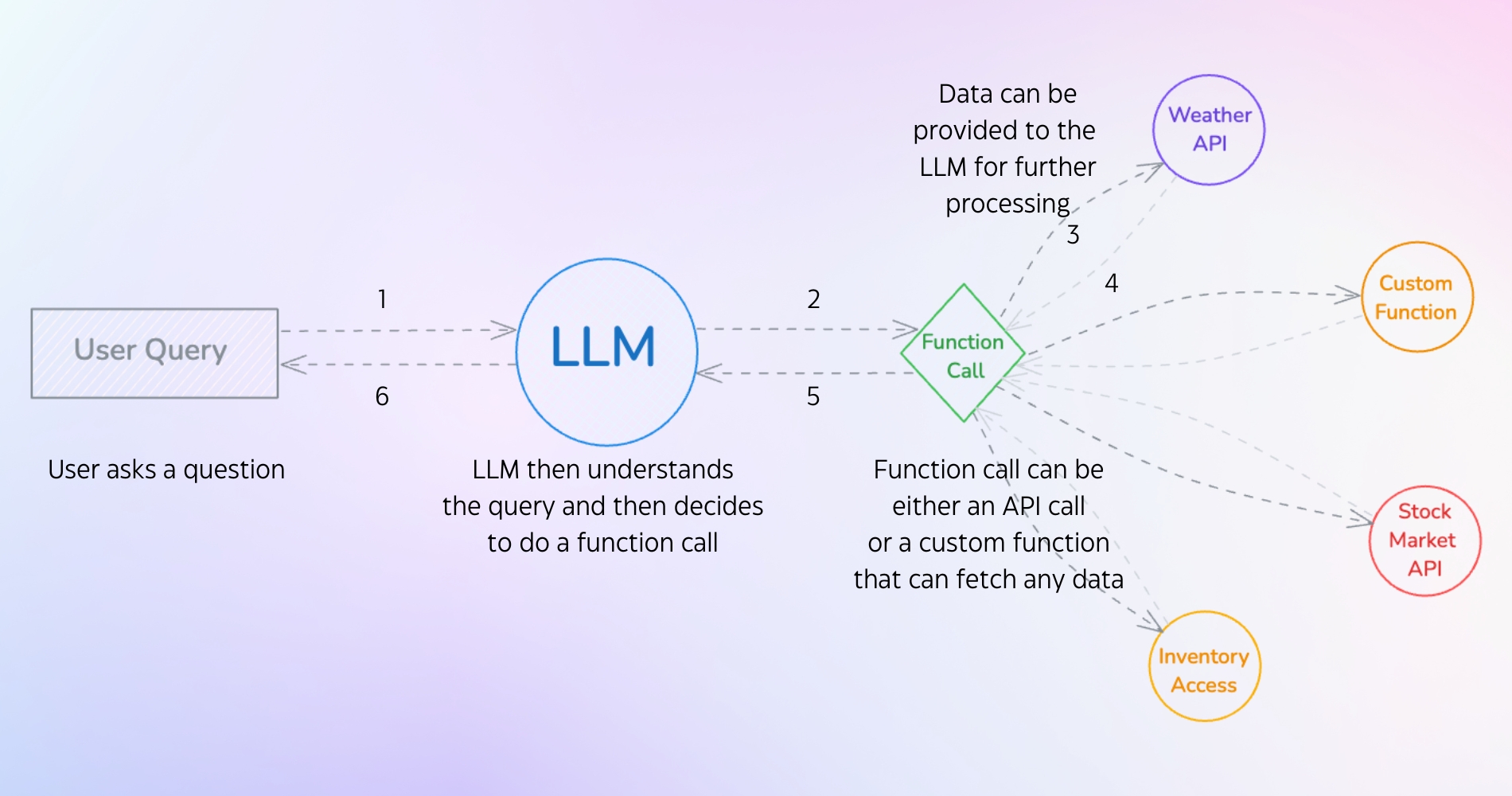
The user sends a query (something like "What leads are in my CRM?" or "Check if product X is in stock"). The LLM analyzes the query and recognizes it needs external data or an action to fulfill the request. If the user asks about CRM leads, the model identifies the need to fetch live data. If they want inventory details, it triggers a database lookup.
Then the LLM decides to execute a function call. This could be an API call (connecting to a CRM API to pull real-time opportunities from Salesforce) or a custom function (accessing an internal database to check stock levels). The function fetches the required data, sends it back to the LLM, and the model processes it into a contextual, accurate response for the user.
Why this matters in practice
Once an LLM can call functions, it stops being limited to text generation. It can retrieve live data and interact with other software, which makes it far more useful in real applications.
The model can pull in current information through function calls to provide accurate answers. Without function calling, asking about current events might return outdated info. With access to a news API, the answers stay current. Function calling can also automate repetitive tasks: a user wants to schedule a meeting, and the LLM calls a calendar API to add the event automatically.
LLMs can also plug into databases, CRMs, and other enterprise systems, making them more useful in professional environments. And instead of answering a single question, the model can orchestrate multiple function calls to solve multi-step problems. Planning a trip might involve checking flight availability, booking a hotel, and renting a car through different APIs, all in one conversation.
There's a practical upside on the maintenance side too. As new functions or APIs become available, the LLM can use them without retraining the entire model.
Function calling in the wild
You've probably already encountered function calling if you've used GPTs from the ChatGPT marketplace. Those GPTs execute custom functions that let people build specialized tools like to-do list builders, prompt enhancers, app connectors, and Q&A bots. ChatGPT's built-in "Tasks" feature uses this same pattern: it sets reminders by triggering functions at specific times.
Claude's Model Context Protocol (MCP) works along similar lines. With Sonnet 3.5, Claude can activate tools like Brave Search for web results, tap into its graph memory system, or link to other apps. Both systems show how AI uses function calls to connect its core intelligence to real-world tools.
Models that support function calling
Note: Sometimes function calling is also known as tool calling. Same concept, different name.
Several major models support this feature:
- OpenAI: GPT-4o
- Meta: Llama 3.3
- Google: Gemini 2.0 Flash Experimental
- Anthropic: Claude
- Cohere: Command R+
- Mistral: Mistral Large, Mistral Small, Codestral, Ministral 8B, Ministral 3B, Pixtral 12B, Pixtral Large, Mistral Nemo
There are many more. These are easily accessible via API, and some are open source and available for local use through Ollama.
Function calling in action: building an AI search tool with Ollama
We're going to build a search tool where Llama 3.2 acts as a decision-maker. It analyzes whether a query requires real-time web data, and if it does, it triggers the web_search tool automatically via Ollama's tool-calling API. This is similar to how Perplexity balances AI reasoning with live data.
What we need:
- Ollama: Hosts the Llama 3.2 model locally.
- Python 3.11+: Required for async/await patterns (critical for performance).
- SerpApi: Free tier supports 250 searches/month. (Link)
Defining the function
Note: Ollama refers to this as tool calling, which is the same thing as function calling.
This is our tool definition. The parameters are based on the response schema returned by Google via the SerpApi:
# Define our search tool
search_tool = {
    'type': 'function',
    'function': {
        'name': 'web_search',
        'description': 'Search the web for current information on a topic',
        'parameters': {
            'type': 'object',
            'required': ['query'],
            'properties': {
                'query': {
                    'type': 'string',
                    'description': 'The search query to look up'
                }
            }
        }
    }
}
This definition will be used in main.py, where we make a call to Ollama and let it decide whether to invoke the tool.
The project structure looks like this:
project_folder/
├── .env
├── search_tool.py
└── main.py
Quick explanation of each file:
.envisolates API keys from codesearch_tool.pyseparates search logic for reusabilitymain.pyfocuses on orchestration (the model-to-tool interaction loop)
Install the required packages:
pip install ollama python-dotenv requestsThe main workflow (main.py)
The main file handles three things: it uses AsyncClient for concurrent tool calls without blocking, checks for tool_calls in the response and maintains conversation state through a messages array, and returns auth/search errors directly to users.
Here's the code:
import asyncio
from ollama import AsyncClient
from search_tool import web_search, extract_content


async def process_query(query: str) -> str:
    client = AsyncClient()


    # Define our search tool
    search_tool = {
        'type': 'function',
        'function': {
            'name': 'web_search',
            'description': 'Search the web for current information on a topic',
            'parameters': {
                'type': 'object',
                'required': ['query'],
                'properties': {
                    'query': {
                        'type': 'string',
                        'description': 'The search query to look up'
                    }
                }
            }
        }
    }


    # First, let Ollama decide if it needs to search
    response = await client.chat(
        'llama3.2',
        messages=[{
            'role': 'user',
            'content': f'Answer this question: {query}'
        }],
        tools=[search_tool]
    )


    # Initialize available functions
    available_functions = {
        'web_search': web_search
    }


    # Check if Ollama wants to use the search tool
    if response.message.tool_calls:
        print("Searching the web...")


        for tool in response.message.tool_calls:
            if function_to_call := available_functions.get(tool.function.name):
                # Call the search function
                search_results = function_to_call(**tool.function.arguments)


                if "error" in search_results:
                    if search_results["error"] == "authentication_failed":
                        return "Authentication failed. Please check your API key."
                    return f"Search error: {search_results['error']}"


                # Extract relevant content
                content = extract_content(search_results)


                if not content:
                    return "No relevant information found."


                # Add the search results to the conversation
                messages = [
                    {'role': 'user', 'content': query},
                    response.message,
                    {
                        'role': 'tool',
                        'name': tool.function.name,
                        'content': content
                    }
                ]


                # Get final response from Ollama with the search results
                final_response = await client.chat(
                    'llama3.2',
                    messages=messages
                )


                return final_response.message.content


    # If no tool calls, return the direct response
    return response.message.content


async def main():
    question = input("What would you like to know? ")
    print("\nProcessing your question...")
    answer = await process_query(question)
    print("\nAnswer:")
    print(answer)


if __name__ == "__main__":
    asyncio.run(main())
The search implementation (search_tool.py)
The search tool handles API error catching (401 and 429 specifically) and content extraction. It prioritizes answer_box results (featured snippets) and limits output to 4 results to avoid token overflow.
Here's the code:
import os
import requests
from typing import Dict, Any
from dotenv import load_dotenv


# Search the web using SerpApi
def web_search(query: str) -> Dict[Any, Any]:
    load_dotenv()
    api_key = os.getenv('SERPAPI_API_KEY')


    if not api_key:
        return {"error": "API key not found in environment variables"}


    url = "https://serpapi.com/search"


    params = {
        "engine": "google",
        "q": query,
        "api_key": api_key,
        "num": 5
    }


    try:
        response = requests.get(url, params=params)


        if response.status_code == 401:
            return {"error": "Invalid API key or authentication failed"}
        elif response.status_code == 429:
            return {"error": "Rate limit exceeded"}


        response.raise_for_status()
        return response.json()


    except requests.exceptions.RequestException as e:
        error_msg = f"Error fetching search results: {e}"
        if hasattr(e, 'response') and e.response:
            try:
                error_details = e.response.json()
                error_msg = f"{error_msg} - {error_details.get('message', '')}"
            except:
                pass
        return {"error": error_msg}


# Extract relevant content from search results since a lot of data is returned from the API
def extract_content(search_results: dict) -> str:
    content = []


    if "organic_results" in search_results:
        for result in search_results["organic_results"][:4]:  # Taking the top 4 results
            if "snippet" in result:
                content.append(result["snippet"])


    if "answer_box" in search_results and search_results["answer_box"]:
        if "answer" in search_results["answer_box"]:
            content.insert(0, search_results["answer_box"]["answer"])


    return "\n\n".join(content)
Create a .env file and store your API key in it. You can get your SerpApi key here.
SERPAPI_API_KEY=ABCD123
Then run it:
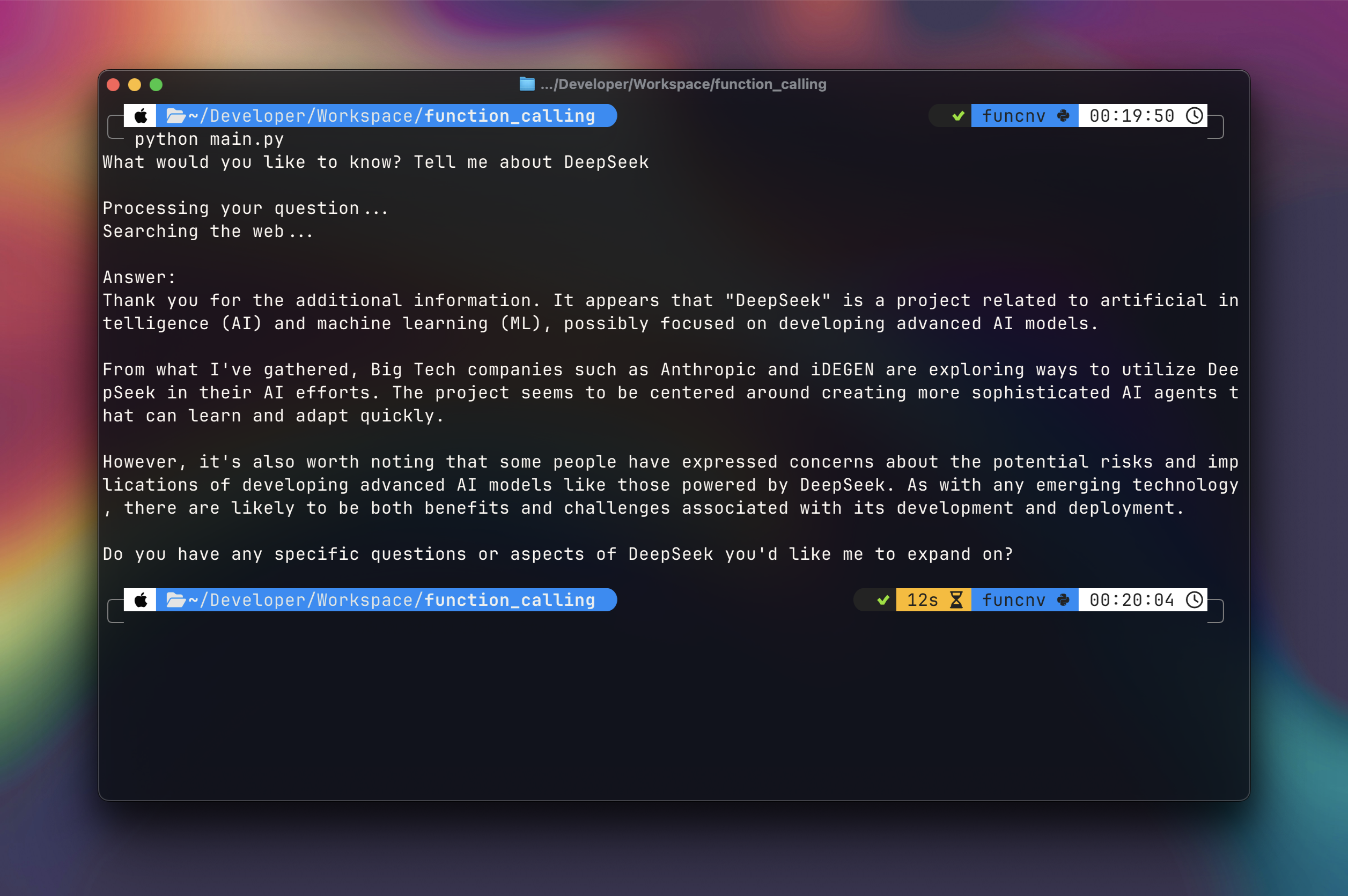
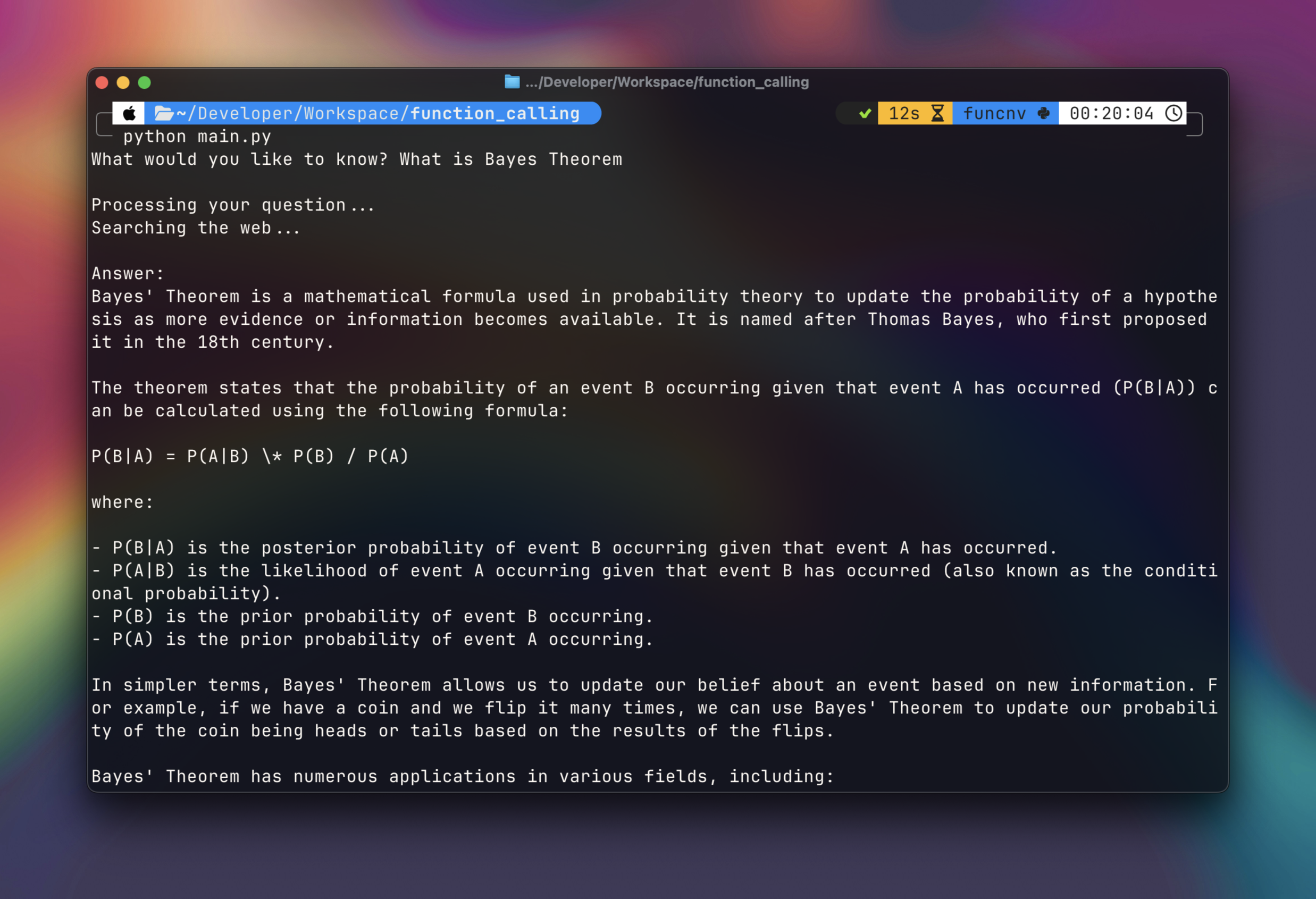
python main.pyAsk any question, and Ollama will decide whether to use the search tool or respond from its own knowledge.
The full code is on GitHub here.
Where this goes from here
Function calling turns LLMs from conversational tools into something closer to actual software agents. They can pull live data from your CRM, check inventory levels, and chain together multi-step workflows across different APIs. The gap between "chatbot" and "useful automation" gets a lot smaller once the model can reach out and touch external systems.
If you're building with function calling in your AI agents or applications, we'd love to hear about it. Get in touch with our team.
References & Tools:
Ready to get started?
Scale your integration strategy and deliver the integrations your customers need in record time.